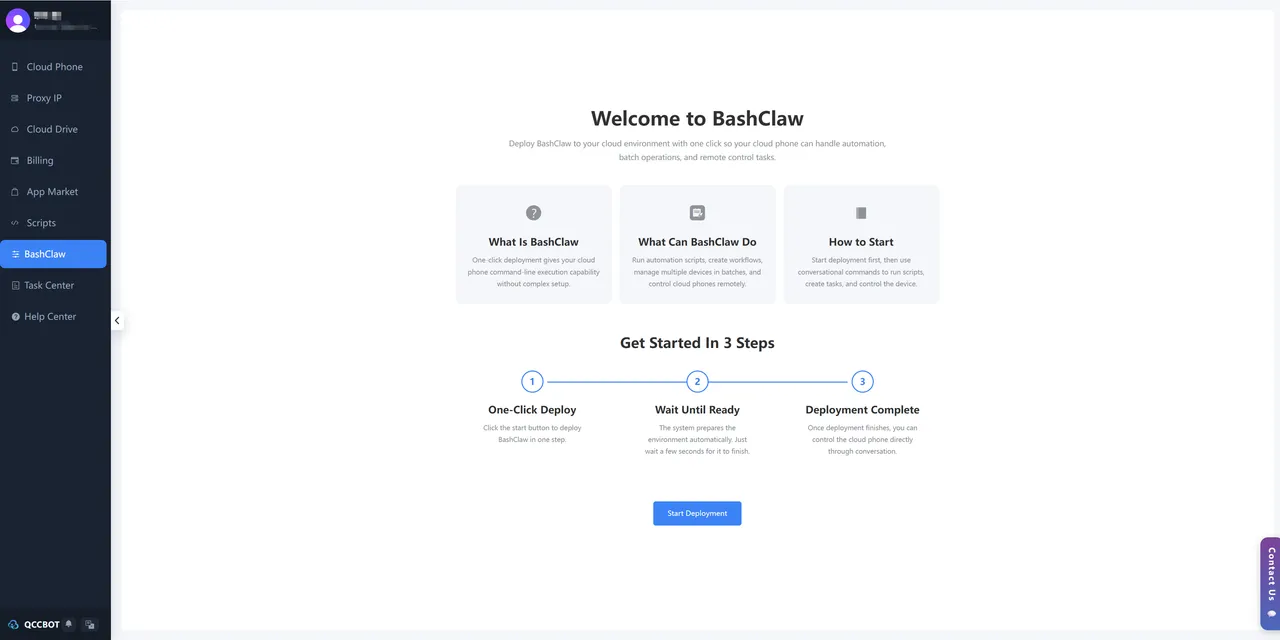
What Is BashClaw?
BashClaw is a developer-focused automation tool embedded directly inside the QCCBot cloud phone platform. It gives programmers, crawling engineers, and AI practitioners the ability to control cloud phone instances via command-line — without complex setup, without configuration headaches.
In short: if QCCBot is the device layer, BashClaw is the engine that makes those devices execute.
Who Is It For?
BashClaw is built for technical users who need more than a GUI:
- Programmers who want to script and automate mobile workflows
- Crawling engineers running large-scale data collection tasks
- AI practitioners building automated pipelines on mobile environments
If you’ve ever wished you could type a command and have 50 cloud phones respond — BashClaw is exactly that.
How It Works: Three Steps to Full Control
Getting started with BashClaw is intentionally frictionless:
Step 1 — One-Click Deploy Launch the BashClaw environment from within QCCBot with a single click. No terminal configuration, no dependency hunting.
Step 2 — Wait Until Ready The system automatically prepares your runtime environment. This typically takes just a few seconds.
Step 3 — Deployment Complete Once ready, you interact with your cloud phones through a conversational command interface — issue instructions, run scripts, and manage devices in real time.
Core Capabilities
⚙️ Automation Script Execution
Run batch script tasks across multiple cloud phone instances simultaneously. Build automated workflows that handle repetitive mobile operations at scale.
📱 Bulk Device Management
Control dozens of cloud phone devices from a single command interface. Coordinate actions, sync states, and orchestrate complex multi-device workflows without manual intervention.
🖥️ Remote Command Execution
Execute operations remotely via command line — no need to interact with each device’s screen individually.
How BashClaw Compares
| BashClaw | Competitors | |
|---|---|---|
| Deployment & API Key | Bundled in one | Sold separately |
| Billing model | Pay-as-you-go, credits never expire | Monthly subscription only |
| Documentation | Comprehensive technical docs | Sparse, poor after-sales support |
| Community | Active developer community | Minimal support |
Part of a Bigger Ecosystem
BashClaw is the automation engine in a three-product stack:
- QCCBot provides isolated cloud phone devices
- BashClaw adds command-line execution and batch control
- Ainnc handles bulk content publishing across platforms
Together, they cover the full Device → Execution → Content pipeline for overseas operations.
Get Started
BashClaw is currently active and available inside the QCCBot platform. If you’re already a QCCBot user, you’re one click away from command-line control over your entire cloud phone fleet.
Built for developers who don’t want to compromise between power and simplicity.
Learn how QCCBot can help your team manage cloud phones and AI automation workflows.
Questions to ask before choosing a tool
If your team is evaluating tools for developer cloud phone API workflows, avoid choosing based only on a polished demo.
Ask practical questions:
- Can we group devices by account, market, project, or task?
- Can we run the same script across a small test group first?
- Can we see task status without opening every phone?
- Can failures be grouped by reason?
- Can AI help debug script errors?
- Can AI recovery be turned on or off?
- Can sensitive issues stay under human control?
These questions reveal whether the tool fits daily operations.
What good content teams and operations teams care about
They care less about abstract automation and more about predictable routines.
A good routine says: this task runs at this time, on this group, with this expected result, and these exceptions are handled in this way.
Once the routine is clear, automation becomes easier to improve. Without that routine, even advanced AI can feel chaotic.
A practical first step
Pick one task that wastes time every week. Run it on three cloud phones. Record every place it gets stuck. Then decide which stuck points are safe to automate and which should be reviewed.
That small test will teach more than a large rollout with no clear measurement.
How QCCBot fits
QCCBot gives teams the pieces to run that test: Android cloud phones, script execution, AI script generation, logs, and exception handling. The goal is to make repeated mobile work easier to operate, not harder to understand.
If this sounds like the kind of mobile work your team deals with, QCCBot can help you test the workflow on cloud phones and decide what should be automated first.
How to turn this into a weekly operating routine
A useful article should leave the reader with a next step, so here is a simple routine teams can use for developer workflows.
First, choose one workflow owner. This does not have to be a developer. It can be the person who understands the daily mobile task best. That person should define what normal means, what abnormal means, and which situations are too sensitive for automation.
Second, create a small test group. Three to five cloud phones are enough. Run the workflow there before expanding. The goal of the test is not only to prove that the script can pass. The goal is to discover the common ways it fails.
Third, review the failed runs by category. Do not open every device in random order. Group issues into practical buckets:
- app loading or network delay;
- permission or update popup;
- account logged out;
- UI changed after app update;
- script timing problem;
- human-review case.
Fourth, improve the workflow one category at a time. If half the failures come from a permission popup, solve that first. If the biggest issue is login state, add a pre-check before the main task. This is how thin automation becomes a real operating system.
What a good internal note should include
For every repeated mobile task, keep a short internal note:
- what the task is for;
- which cloud phone group it runs on;
- what success looks like;
- what the most common failures are;
- what AI is allowed to recover;
- what must go to a human;
- where the logs are reviewed.
This note prevents the workflow from living only in one person’s head.
The practical takeaway
The goal is not to make every mobile task fully automatic on day one. The goal is to make the work less blurry. Once the team can see the task state, failure reason, and review queue, automation becomes easier to trust.
That is the type of workflow QCCBot is meant to support: repeated Android app work that needs cloud phones, scripts, AI debugging, logs, and controlled exception handling in one place.